
Douyin Video Download Not Working ? 9 Fixes to Try
October 2, 2026 · By Moait
Trying to download a Douyin video but nothing happens, the link is rejected, or the download starts and then fails? This can happen for several reasons, including an incomplete URL, a video that is no longer public, browser problems, network issues, or temporary restrictions affecting the source.
The good news is that many Douyin video download problems can be fixed in a few minutes. The following nine solutions cover the most common issues, starting with the simplest checks and moving toward alternative download methods.
Why Is My Douyin Video Download Not Working? Common Causes Explained
A Douyin video may fail to download even when the video plays normally in the Douyin app or website. Watching a video and retrieving its underlying video file are not always the same process.
Common reasons for a failed Douyin video download include:
- The copied link is incomplete or incorrect.
- The video has been deleted or made private.
- The shared URL has expired or changed.
- The link contains extra text from Douyin’s sharing feature.
- Your browser is preventing the download.
- Cached browser data is interfering with the request.
- Your internet connection is unstable.
- A v.douyin.com short link is not being processed correctly.
- The particular video is temporarily unavailable to the downloader.
- The current download method cannot access the available video source.
Before assuming that the downloader itself is broken, it is worth checking the link and the video’s availability first. In many cases, the problem is specific to the URL or video rather than the entire service.
9 Ways to Fix Douyin Video Download Problems
1. Check the Douyin Link Before Trying Another Download
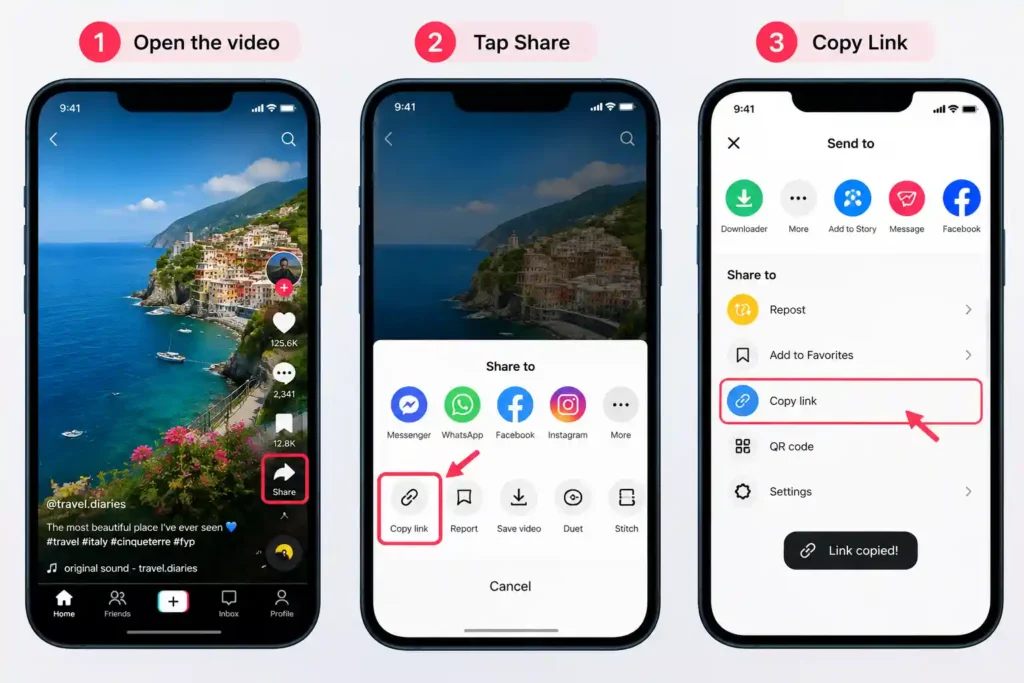
The first thing to check is the Douyin video link itself.
When you use Douyin’s Share option, make sure you actually copied the video URL. Depending on where you copy the link from, the shared text can sometimes contain additional information around the URL.
A valid link may look like a full Douyin URL or a short link using the v.douyin.com domain.
Before trying again:
- Return to Douyin.
- Open the video you want to save.
- Tap or click Share.
- Choose Copy Link.
- Paste the copied URL into the downloader.
- Try processing the video again.
Avoid manually typing the URL because even a small change to the address can prevent the video from being identified correctly.
If the link came from an old message, social post, or another website, it is also worth returning to the original Douyin video and copying a fresh link.
2. Make Sure the Video Is Still Public
Another common reason a Douyin download fails is that the video is no longer publicly accessible.
A creator can remove a video, change its visibility, or otherwise restrict access to content. A previously shared link may therefore stop working even though you still have the URL.
Open the video directly on Douyin and check whether it can still be viewed normally.
If the video:
- has been deleted,
- has been made private,
- is no longer available in your region,
- or requires access that the downloader cannot obtain,
a third-party downloader may not be able to retrieve it.
In this situation, repeatedly submitting the same URL usually will not solve the problem. The underlying issue is that the required video source is no longer publicly available.
3. Try Copying the Douyin Link Again
Sometimes the simplest solution is to generate a new link.
Instead of repeatedly using the same URL, open the video again in Douyin and copy the link directly from the Share menu.
This is particularly useful when you copied the link several hours or days ago, received it through another platform, or copied it from a message containing additional text.
For the cleanest result, use the original Douyin page as your source:
Open video → Share → Copy Link → Paste → Download
This also helps rule out a malformed or outdated URL as the cause of the problem.
4. Try a Different Browser or Device
If the link is valid and the video is publicly accessible, your browser could be causing the problem.
A browser may block a download because of its security settings, an extension, a corrupted session, or a temporary problem with cached data.
Try opening the downloader in another browser.
For example:
- Chrome
- Safari
- Microsoft Edge
- Firefox
You can also try another device. If the download fails on your phone, test the same public Douyin link from a computer. Conversely, if it does not work on your desktop, try your phone.
If the same URL works on another browser or device, the original problem is likely related to the browser environment rather than the Douyin video itself.
5. Clear Your Browser Cache and Cookies
An outdated browser cache can sometimes interfere with websites and download processes.
If SaveDou or another downloader was working previously but suddenly stopped responding correctly, clearing cached website data can help eliminate an old session or corrupted cached resource.
The exact steps depend on your browser, but generally you can find these controls under Settings → Privacy and Security → Clear browsing data.
You do not necessarily need to delete everything. Start with cached files and cookies for the affected website if your browser allows you to remove site-specific data.
After clearing the data:
- Close and reopen the browser.
- Visit the downloader again.
- Copy a fresh Douyin link.
- Paste it into the download field.
- Try the request again.
6. Check Your Internet Connection
A download can fail if your internet connection becomes unstable while the video is being processed or transferred.
This is particularly noticeable with larger HD video files because they require more data to be transferred successfully.
Try opening several other websites to confirm that your connection is working normally.
If the connection is unstable:
- Switch from mobile data to Wi-Fi.
- Try another Wi-Fi network.
- Restart your router if necessary.
- Move to an area with a stronger mobile signal.
- Wait until the connection becomes stable before retrying.
If other websites work normally but only one particular Douyin video fails, the issue is more likely related to that video or its source.
7. Try the Douyin Short Link Again
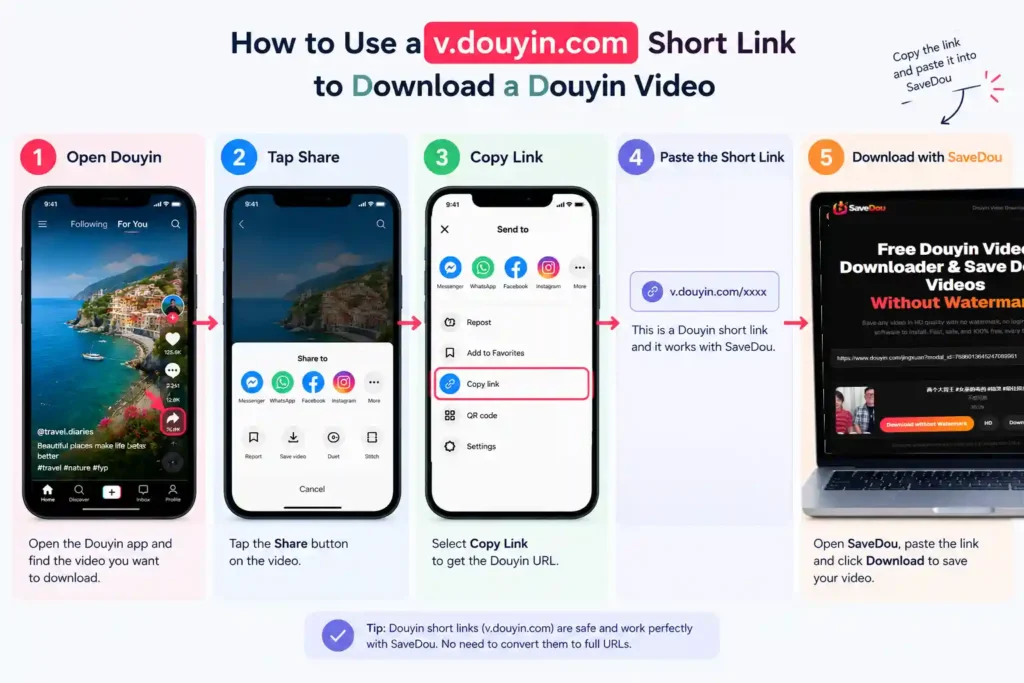
Douyin frequently uses short URLs such as:
v.douyin.com/…
These links are convenient for sharing, but they ultimately redirect to the relevant Douyin content.
If a v.douyin.com download is not working, go back to the original video and copy the short link again rather than relying on an old copy.
Then paste the complete short URL into the downloader.
If possible, avoid modifying the link manually. Do not remove characters from the URL or combine it with unrelated text.
If the short link continues to fail, opening the video on Douyin first and generating a fresh Share link can help determine whether the problem is with the old URL or with the video itself.
8. Try a Different Download Method
If the normal download attempt does not work, try another supported way of obtaining the same video.
For example, instead of using an old link saved in your browser history, open the video directly on Douyin and create a new Share link.
You can also test the same URL from another browser or device.
The goal is to determine where the failure occurs:
- If several different Douyin videos fail, the problem may be related to the downloader, browser, or network.
- If only one video fails, the problem may be specific to that video’s availability.
- If the link works on another browser, your original browser may be responsible.
- If a fresh link works but an old one does not, the original URL may have become invalid or outdated.
This simple process of elimination can save time instead of repeatedly submitting the same failed request.
9. Use a Douyin Video Downloader Online
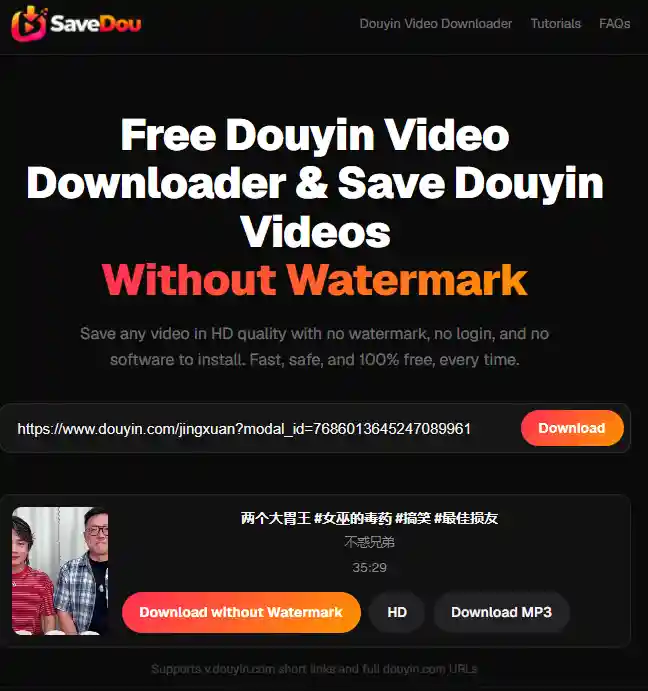
If the normal download process is inconvenient or you want a simpler way to process a public Douyin link, an online Douyin video downloader can handle the URL directly through your browser.
With SaveDou, the basic process is:
- Copy the Douyin video link.
- Open the SaveDou downloader.
- Paste the link into the input field.
- Select Download.
- Save the available video file to your device.
SaveDou supports Douyin short links and full Douyin URLs, so you do not normally need to manually convert a v.douyin.com link before submitting it.
If you want to download a supported public video without installing software, you can use the Douyin video downloader directly.
When Is a Douyin Video Impossible to Download?
Sometimes there is no technical fix because the video itself is no longer accessible.
A Douyin video may be impossible to download when the underlying video source cannot be accessed. Common situations include a video that has been deleted, made private, restricted by its creator, or otherwise removed from public access.
A downloader cannot retrieve a video file that is no longer available to it.
There is also an important difference between watching a video on Douyin and downloading its source file. A video may play normally inside Douyin while its underlying media source is unavailable to a third-party service.
If you have tried the fixes above, a useful final test is to copy the link to another publicly available Douyin video and try that URL.
If the second video works while the original does not, that is a strong indication that the problem is specific to the original video or URL.
If multiple public videos consistently fail, check the browser, network connection, and downloader again before concluding that the videos themselves are unavailable.